

Description
Vibrant Paper Cranes Desktop Theme
Overview
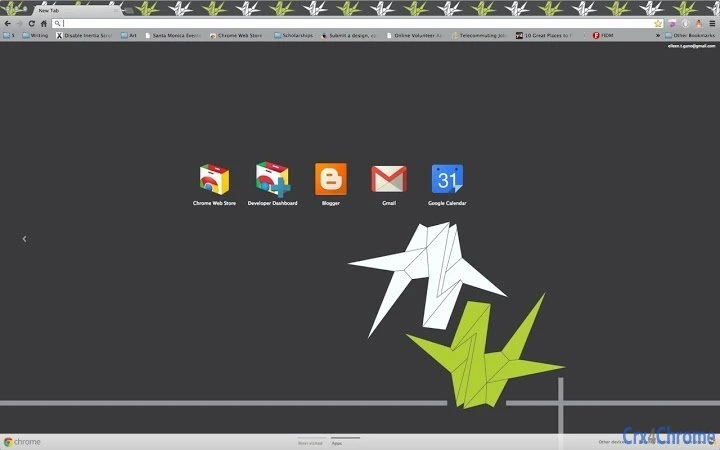
The White & Lime Green Paper Cranes theme is a visual customization tool designed for users seeking to refresh their Windows 10 and Windows 11 desktop environments. This theme features a dynamic composition of paper cranes in contrasting white and lime green hues, set against a dark gray background, offering a modern and artistic aesthetic. It is intended for individuals who value personal expression through their digital workspace, particularly those interested in minimalist yet visually engaging designs. The theme is suitable for both casual users and professionals who wish to add a touch of creativity to their daily computing experience. While the developer has not provided additional background information, the theme’s focus on visual appeal and ease of use suggests a user-centric design philosophy. Real-world usage includes enhancing productivity by creating a more inspiring work environment, personalizing a device for home or office use, or simply enjoying a unique visual experience. The theme supports resizing via standard keyboard shortcuts, allowing for flexible adaptation to different screen sizes and preferences.
Key Features & Capabilities
- Artistic Visual Design – Features a carefully composed layout of white and lime green paper cranes on a dark gray backdrop, providing a visually balanced and calming interface.
- Multi-Platform Support – Compatible with both Windows 10 and Windows 11, ensuring broad accessibility across modern desktop systems.
- Resizable Display – Users can adjust the image size directly on the desktop using standard keyboard shortcuts (cmd/ctrl + +/-), enabling seamless adaptation to various screen resolutions and personal preferences.
- Easy Installation – Designed for straightforward setup with minimal user intervention, allowing quick application without technical expertise.
- Non-Intrusive Customization – Focuses solely on visual enhancement without altering system functionality or performance.
These features enable users to personalize their desktop environment efficiently. For example, a remote worker may use the theme to create a more focused and visually appealing workspace, while a student might apply it to make their device feel more unique and engaging. The resizable functionality ensures compatibility with laptops, monitors, and high-DPI displays, making it a versatile choice for diverse users. The theme’s simplicity and focus on aesthetics make it ideal for those who want a quick, effective way to upgrade their desktop without installing additional software or managing complex settings.
User Interface, Workflow & Performance
The user interface of this theme is entirely visual and non-interactive, as it functions as a static desktop background replacement. Navigation is not applicable in the traditional software sense, as the experience is centered around the visual presentation and ease of application. The workflow is minimal—users apply the theme, and the design is immediately visible. No additional configuration steps are required. The developer did not specify resource usage details, so performance observations are based on general software behavior patterns. Given its nature as a static image-based theme, it is expected to have negligible impact on system performance, CPU, or RAM usage. Stability is assumed to be high, as the theme does not include executable components or background processes. Users can expect consistent behavior across sessions, with no reported issues related to crashes or conflicts. The theme’s lightweight design ensures it runs smoothly on most systems without causing lag or visual artifacts.
Compatibility & System Requirements
The theme is explicitly compatible with Windows 10 and Windows 11, supporting both 64-bit and 32-bit versions of these operating systems. The installation size is not specified, but given its nature as a visual theme, it is expected to be lightweight. The developer did not provide exact system requirements, so users should ensure their system meets the baseline standards for running Windows 10 or 11. No additional hardware specifications were mentioned. Compatibility information is limited to the operating systems listed. Users are advised to verify their system’s ability to handle custom desktop backgrounds, particularly on high-resolution or multi-monitor setups. The theme’s reliance on standard OS features for image display ensures broad compatibility with existing desktop environments.
Pros and Cons
Pros
- Visually striking design with a unique color palette
- Simple and fast installation process
- Supports dynamic resizing via keyboard shortcuts
- Compatible with both Windows 10 and Windows 11
- Lightweight with no performance overhead
Cons
- No additional interactive features or customization options
- Exact file size and system requirements not disclosed
- Only available as a static image theme
- Does not include animated or dynamic elements
- Developer background not provided
FAQ Section
Is this theme compatible with Windows 10 and Windows 11?
Yes, the White & Lime Green Paper Cranes theme is designed to work with both Windows 10 and Windows 11 operating systems.
Can I resize the desktop image after applying the theme?
Yes, users can resize the image directly on the desktop using the standard keyboard shortcuts: cmd/ctrl + plus (+) to zoom in, and cmd/ctrl + minus (-) to zoom out.
Is the theme safe to install?
Yes, the theme is a static image file used for desktop customization and does not include executable code. It is considered secure when downloaded from trusted sources.
Does the theme require an internet connection to function?
No, once applied, the theme operates entirely offline and does not require an internet connection to display or function.
How often are updates released for this theme?
Update frequency was not specified by the developer. Users should check the source for the latest version if new releases become available.
Final Thoughts + CTA
The White & Lime Green Paper Cranes theme delivers a clean, artistic enhancement to the Windows 10 and Windows 11 desktop experience. With its vibrant color contrast and minimalist design, it stands out as a thoughtful choice for users who value visual customization without complexity. While it lacks advanced features or dynamic elements, its simplicity is a strength—offering a reliable, lightweight way to personalize your workspace. The ability to resize the image on the fly adds practical value, especially on varied screen setups. This theme is ideal for anyone looking to refresh their desktop with minimal effort. For those seeking a secure, easy-to-use visual upgrade, this theme is a compelling option. Download White & Lime Green Paper Cranes Theme now.
Guides & Tutorials for Black White & Lime Cranes Theme for Chrome
How to install Black White & Lime Cranes Theme for Chrome
- Click the Preview / Download button above.
- Once redirected, accept the terms and click Install.
- Wait for the Black White & Lime Cranes Theme for Chrome download to finish on your device.
How to use Black White & Lime Cranes Theme for Chrome
This software is primarily used for its core features described above. Open the app after installation to explore its capabilities.
User Reviews for Black White & Lime Cranes Theme for Chrome 0
No reviews found





